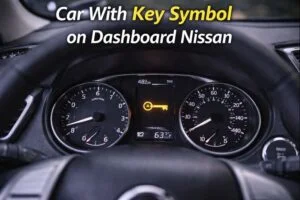
You climb into your Nissan, buckle up, turn the ignition, and notice a small key or a car-with-key icon glowing on the dash. The engine may start and run fine, or it may refuse to crank at all.
Either way, the sight of that symbol is unsettling: is it just a low key fob battery, or something that will leave you stranded? Nissan uses that indicator to report problems with the Intelligent Key and the vehicle’s immobilizer/security system.
The light has a few different meanings depending on how it flashes or what other messages appear, and the right response can be anything from swapping a coin cell to a dealer reprogramming a key.
This article breaks it down clearly: what the icon means, why it appears, quick checks you can do, step-by-step troubleshooting, likely repairs and costs, and how to avoid the problem in the future.
Short note on sources
This article’s practical guidance is based on Nissan’s official explanations for dashboard indicators and Intelligent Key operation, combined with repair and immobilizer-system overviews used by professional technicians and trusted automotive information outlets.
Primary references consulted include Nissan’s dashboard indicator documentation and owner’s manuals, plus independent technical explainers about immobilizers and key systems.
What that key symbol actually is
On modern Nissans the key or car-with-key icon is the security / immobilizer indicator or an Intelligent Key status light. It’s part of the vehicle’s anti-theft system and indicates the communication or authorization state between the car and its key fob.
How it behaves — solid, flashing slowly, flashing rapidly, appearing with a message like “Key ID Incorrect” or “Intelligent Key Battery Low” — determines the story. The manufacturer’s dashboard lights guide explains the indicator and recommends dealer service when it won’t clear.
In short: the light says the car either does not detect a valid key signal, the key battery is weak, or the immobilizer (which validates keys before allowing the engine to start) has a fault. We’ll walk through each of those possibilities and what to do.
Two common scenarios you’ll see
Most drivers see the symbol in one of two ways; how it looks is your first clue.
- Flashing slowly while the car is off — This is usually normal: the immobilizer is armed and the system is showing it’s active as a theft deterrent. A slow blink when the ignition is off is expected.
- Solid light or rapid flashing when trying to start, or message “Key ID Incorrect” / “Check Intelligent Key” — This indicates the car is not recognizing the key or there is a communication or immobilizer fault. In many cases this will prevent starting, or the engine may start but die shortly after, or the vehicle may run with a warning. This needs troubleshooting.
If you see a light with the words “START ERROR” or the car won’t crank and displays “Key Not Recognized,” treat it as a key/recognition problem rather than an engine mechanical failure.
Why the light appears — the practical causes
Here are the real-world reasons this symbol shows up, listed from most common and easy to fix to less common and more expensive.
1) Weak or dead Intelligent Key battery
The most common cause is simple: the coin cell inside your key fob is low. When the key’s RF signal gets weak the car may not reliably detect the fob.
Nissan manuals specifically call this out and provide an in-car workaround (touching the key to the start button) or instruct replacement of the battery.
2) Key not recognized (dirty key, damaged transponder, or unpaired key)
Physical damage to the key, water intrusion, or a key that hasn’t been programmed to this vehicle will cause the immobilizer to block starting. If you’re using a spare or aftermarket key, the car may simply not accept it.
3) RF interference or poor key-to-car positioning
Strong radio sources, nearby transmitters, or even certain phone cases can interfere with the key fob signal. Low-key-signal situations inside garages or near other electronics can cause intermittent recognition.
The car’s manual recommends holding the key close to the start button if the battery is low or interference suspected.
4) Immobilizer or EIS module fault (electronic security system problem)
Less frequent but more serious: the car’s immobilizer module, electronics in the ignition (EIS), or related wiring or CAN-bus network may have a fault.
When the immobilizer cannot authenticate keys due to module failure or corrupted data, the light may stay on and the car may refuse to start. Dealer diagnostics are often required.
5) Battery or power issues in the car (low vehicle battery, blown fuse)
A weak vehicle battery or failed fuse/relay that powers the ignition/key detection circuit can cause messages and light-ups. If the main battery has low voltage, modules may behave unpredictably and misreport key communication.
6) Software or programming glitches
Occasionally a module software bug or interrupted programming sequence (for example, a failed key-programming attempt) will cause the key system to go into a fault state. OEM dealers have access to reflash and reprogram tools to fix those cases.
First, do the quick checks — what to try in minutes
Before you call a tow truck or dealer, try these fast, safe steps in this order.
- Try the spare key
If you have a second Nissan key, use it. If the spare starts the car, the problem is almost certainly the original key (battery or transponder fault). - Replace the key fob battery
These are inexpensive coin cells. Replace it, then re-test. Nissan manuals show how to replace the battery and also document a method to start the car by touching the Intelligent Key to the start button if the battery is dead. - Hold the key close to the start button
If the battery is weak or interference is present, pressing the key against the start button often lets the immobilizer read the key’s chip directly and allows starting. This is a documented owner workaround on multiple Nissan models. - Check the main vehicle battery
If the car battery is weak the modules might not power up correctly. Measure voltage (should be ~12.6 V at rest) or try a jump start to see if electronic messages clear. - Check for other dash messages
If the dash shows “Key ID Incorrect” or “Check Intelligent Key,” write down the exact wording — it helps with dealer diagnostics. - Look for obvious damage
Inspect the key for cracks, water damage, or corrosion. If the key has been dropped or exposed to moisture, that can cause failures.
These steps resolve the majority of “key symbol” cases quickly.
Troubleshooting: a step-by-step flow (user-friendly, but thorough)
If the quick checks don’t fix it, follow this structured diagnostic plan.
A. Confirm whether the car is refusing to start or only showing a warning
- If the engine won’t crank or dies after a moment, that’s immobilizer-related and needs attention.
- If the engine runs normally but the symbol stays lit, it’s still a problem but less urgent — it may be an intermittent communication fault.
B. Swap keys and test
- If the spare key starts the car reliably, the original key is suspect. Replace battery and retest. If the spare also fails, proceed to the next steps.
C. Check vehicle battery and fuses
- Verify the vehicle battery has good charge; a low-voltage condition can create weird module faults.
- Inspect relevant fuses related to the Intelligent Key and immobilizer circuits — consult the owner’s manual for locations.
D. Check for RF interference
- Move the vehicle away from possible transmitters (nearby antennas, security equipment) and try again.
- Remove phone from pocket or cover (some phone cases with magnets can interfere).
E. Scan for codes
- If you have an OBD2 scanner, plug in and look for stored codes related to immobilizer, body control module (BCM), or key recognition. Many aftermarket scanners won’t read manufacturer-specific immobilizer codes — a dealer or Nissan-aware shop may be required.
F. Dealer or qualified shop
- If the problem continues after the above, a dealer or locksmith with Nissan programming tools will:
- Check immobilizer module operation (EIS/EZS).
- Confirm key transponder programming and reprogram or clone keys if needed.
- Reflash modules if a software update is required.
- Replace faulty modules or wiring if diagnostics show hardware failure.
- Check immobilizer module operation (EIS/EZS).
Typical fixes and ballpark costs
Below are common repairs tied to the key/immobilizer symbol and typical price ranges (labor varies by region and model).
- Key fob battery replacement — $3–$10 for the cell (DIY). Dealers charge more if they replace the battery for you.
- Key fob replacement (battery + shell + programming) — $50–$300 depending on model and whether key needs dealer programming. Some Nissan smart keys are pricier.
- Reprogram spare key / dealer programming fee — $50–$200 (depends on labor and whether dealer tools are needed).
- Replace faulty immobilizer/BCM/EIS module — $300–$1,200+ parts and labor; expensive on some models. Costs depend on whether the module can be repaired, must be programmed, or replaced as an OEM unit.
- Wiring repair / connector replacement — $50–$400 depending on access and damage.
- Software reflash or update — $0–$200 (some dealers perform as free campaign updates if covered by TSB).
Start with the cheap fixes (battery, spare key) and progress to dealer work only if necessary.
Preventive steps and best practices
These habits reduce the chance of seeing the key symbol unexpectedly.
- Replace key batteries proactively every 2–3 years. Don’t wait for intermittent problems.
- Keep a programmed spare key stored separately — it saves time and money.
- Avoid exposing keys to moisture and strong RF sources. Don’t toss the key in a pocket with a magnetic phone mount or cards with magnets.
- Service vehicle battery and electrical system — weak car batteries cause electronic oddities.
- Keep the owner’s manual handy — it usually shows the key workaround (touching the start button) if the battery is dead.
When the indicator means something else
A few edge cases are worth knowing:
- After battery disconnect — when the vehicle battery is disconnected or replaced, some modules lose learned keys and may need dealer reinitialization. If the symbol joins other errors after a battery swap, this is a clue.
- After collision or module replacement — body control modules and immobilizer modules can become unpaired. Reprogramming is required.
- Intermittent faults — moisture in connectors, slight corrosion, or loose ground wires can cause intermittent communication faults that produce the key symbol sporadically.
These are often diagnosed by inspecting connectors and performing continuity checks.
Safety and practical notes
- If the car refuses to start and you’re in a dangerous spot, move to safety first (tow to a well-lit area). Immobilizer faults are not repairable by roadside tricks except key battery replacement or using the spare.
- Avoid bypassing immobilizers or attempting shortcuts that defeat security systems — that risks damaging expensive modules and can void warranties.
- Keep paperwork of dealer diagnostics and service performed if the fault recurs — repeated failures may qualify for extended warranty or goodwill repairs.
Myths — quick reality check
- Myth: “A key symbol always means the key is bad.”
Reality: Often it’s the key, but sometimes the vehicle electronics or wiring are at fault. - Myth: “Covering the key with foil will block thieves.”
Reality: Blocking signals can stop remote unlock, but the immobilizer still requires a coded transponder; foil isn’t a reliable defense and can cause annoyance if it prevents your own car from recognizing your key. - Myth: “If the key symbol appears, the car will never start.”
Reality: Sometimes the symbol is a warning while the car runs normally; other times it blocks starting — behavior depends on the exact fault.
Short troubleshooting FAQ
- Q: My Nissan shows the key symbol and won’t crank. What’s the first step?
A: Try the spare key and replace the key fob battery. If that fails, check the vehicle battery and fuses, then contact a dealer. - Q: The symbol blinks slowly when the car is off — should I worry?
A: No — a slow blink when off usually means the immobilizer is armed and working correctly. - Q: I replaced the key battery and it still shows the warning. Why?
A: The transponder chip may be damaged, the key may be out of sync, or the vehicle’s immobilizer module may have a fault. Dealer diagnostics are the next step.
When to involve the dealer vs. a locksmith
- Dealer first if the work involves reprogramming multiple modules, warranty coverage, or software updates. Dealers have manufacturer tools and access to technical service bulletins.
- Qualified automotive locksmith — good for lost keys, cloning, or programming spares at often lower cost than dealers. Make sure they have Nissan-compatible equipment and can program immobilizer keys properly.
Final takeaway
A key or car-with-key symbol is almost always a security or key-recognition message: most commonly a weak key battery or a key-transponder communication problem, and less commonly a module or wiring fault.
Start with the simple checks — spare key, fresh coin cell, hold the key to the start button — then progress to battery and fuse checks. If those don’t fix it, dealer diagnostics or a qualified locksmith will identify and solve the deeper issues.
Acting in the right order keeps the repair cheap and gets you back on the road quickly.